How Music Label OS moves a project forward
Four jobs, shown in the product itself, with what each is based on and which plans include it.
Understand the music
Each recording is measured from its audio and placed in the context of its project, alongside what’s still missing before release. It’s evidence for your ears, not a verdict on whether a song is good.


Plans: Analysis uses credits: Starter includes 10 a month, Pro 50, Label 200. Free accounts can run a limited amount.
What’s measured and checked
- Tempo, key, energy, density, brightness, loudness, and structure, from the uploaded file.
- The song’s role in the project, and how closely it matches the project’s other analyzed recordings.
- Format, loudness, and metadata readiness, naming exactly what’s missing, like an ISRC code or songwriter credits.
- Comments pinned to moments in the song, with the metadata and credits that travel with it.
Try it on your own recordings.
Start freeSee what needs attention
Know where each project stands without checking every song. Each project’s status page shows its songs’ stages, the direction your team chose, and one next move. Needs Attention looks across every project for what’s waiting on you.
Inside a project

- Where it stands Each song’s stage, and the release date.
- What was decided The direction the team chose, and when.
- What’s next One clear next move.
Across every project
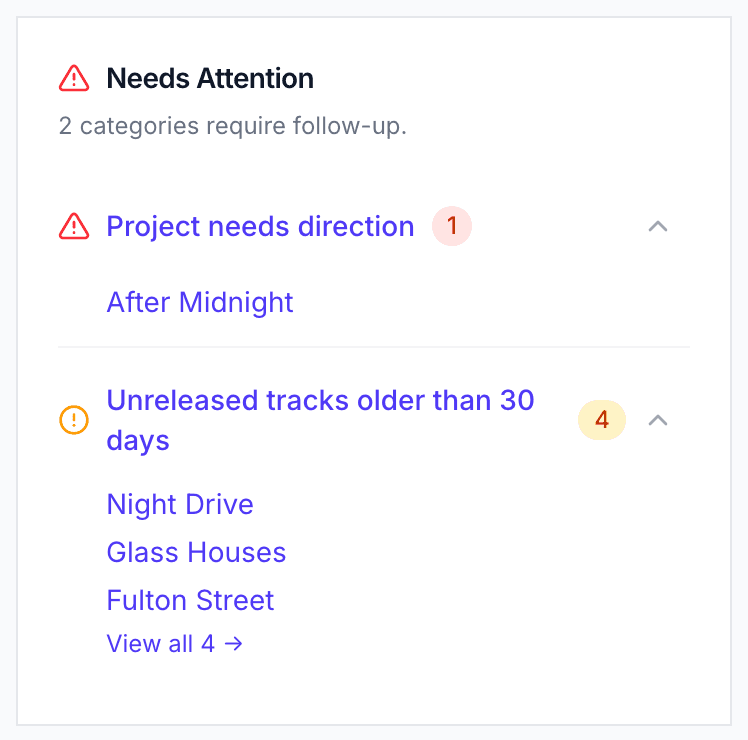
Projects waiting on a direction, stalled projects, songs sitting unreleased, missing audio, and released tracks without streaming links. Here the demo label has one project waiting on a direction and four songs unreleased for over 30 days. Each row opens the work it’s about.
Plans: On every plan. Free covers up to 2 projects and 20 tracks.
Coordinate decisions and work
When a project stalls, Music Label OS says why and offers the choices. Your team makes the decision; Music Label OS records it on the project with the date it was decided. Here’s the demo project After Midnight before its team committed to release.
Music Label OS notices

The team decides

Once they committed to release, the decision and its date appear on the project’s status page.
Plans: On every plan.
The five directions, and decisions song by song
- Continue
- Still actively being developed as this project.
- Commit to Release
- Move this project toward release.
- Hold
- Intentionally paused — not accidentally abandoned.
- Rescope
- The project is changing; some music may continue elsewhere.
- Archive
- The project itself is no longer active.
When a project is rescoped or put on hold, decide what happens to each song:
- Keep with project
- Continue development
- Candidate for standalone release
- Move / consider for another project
- Hold
- Archive from active consideration
Bring in the right people
Bring collaborators into the work they need without opening up your whole workspace. You choose what a link carries; they listen and respond, no account needed.
You
Pick a 60-second preview or the full song, which details come with it (lyrics, credits, stems), when the link expires, and how many views or visitors it allows.

Your collaborator
Sees only what you shared, plays the tracks, and adds their name to comment at the exact second they mean.


Plans: Previews and metadata-only links are on every plan. Full-audio sharing, downloads, and team members are on Pro and Label.
Also in Music Label OS
A catalog of tracks, albums, and artists with review of possible duplicates; imports from Dropbox, Spotify, Deezer, or SoundCloud, or direct upload; sync to your own Notion databases; and campaigns, tasks, and accounting for the business around the music.